Agents, agents, every where,
Nor any drop to drink.
Tech Talk by Gavin Wiggins
September 2, 2026

What is an agent?

None of the above.
“An LLM agent runs tools in a loop to achieve a goal” ~ Simon Willison 2025
Check out Simon Willison's Weblog at simonwillison.net
Agent frameworks
Provide LLM agnostic features to build agents that call tools/functions, maintain state, and coordinate multi-step workflows.
Feels like JavaScript UI frameworks, a new one pops up every month.
- OpenAI Agents SDK - Docs, GitHub
- Microsoft Agent Framework - Docs, GitHub
- Pydantic AI - Docs, GitHub
- AWS Strands Agents - Docs, GitHub
- Google Agent Development Kit (ADK) - Docs, GitHub
- CrewAI - GitHub, Website
- LangChain, LangGraph, LangSmith - Website
⚠️ Be aware of vendor lock-in especially for agent deployment.
OpenAI Agents SDK
Sync and async examples.
            from agents import Agent, Runner

            agent = Agent(name="Assistant", instructions="You are a helpful assistant")

            result = Runner.run_sync(agent, "Write a haiku about recursion in programming.")
            print(result.final_output)
            import asyncio
            from agents import Agent, Runner

            agent = Agent(
                name="History Tutor",
                instructions="You answer history questions clearly and concisely.",
            )

            async def main():
                result = await Runner.run(agent, "When did the Roman Empire fall?")
                print(result.final_output)

            if __name__ == "__main__":
                asyncio.run(main())
Connecting an MCP server to the agent.
            import asyncio

            from agents import Agent, HostedMCPTool, Runner

            async def main() -> None:
                agent = Agent(
                    name="Assistant",
                    instructions="Use the DeepWiki hosted MCP server to inspect openai/openai-agents-python.",
                    tools=[
                        HostedMCPTool(
                            tool_config={
                                "type": "mcp",
                                "server_label": "deepwiki",
                                "server_url": "https://mcp.deepwiki.com/mcp",
                                "require_approval": "never",
                            }
                        )
                    ],
                )

                result = await Runner.run(
                    agent,
                    "Which language is the repository openai/openai-agents-python written in?",
                )
                print(result.final_output)

            asyncio.run(main())
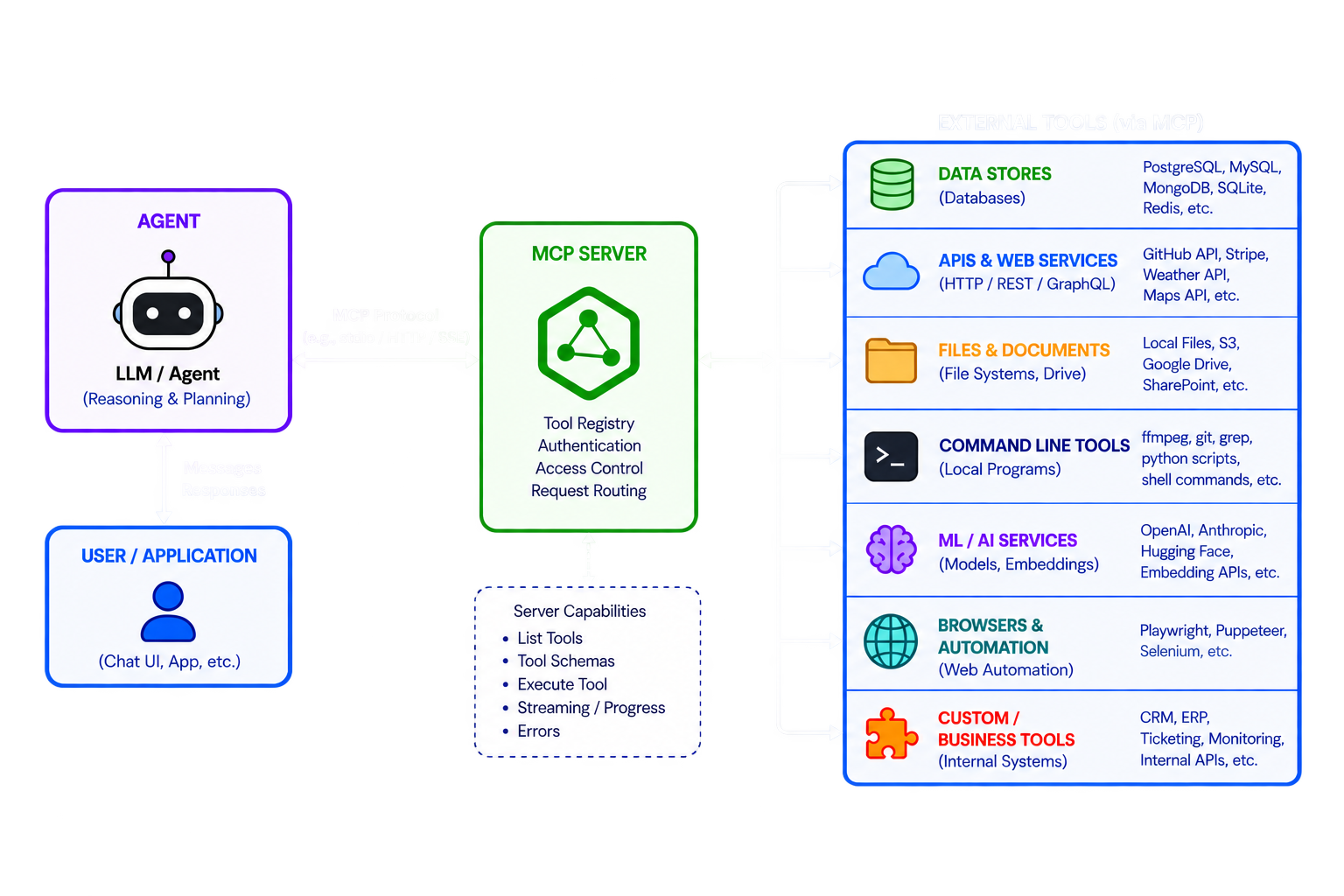
MCP servers
MCP (Model Context Protocol) is an open-source standard for connecting AI applications to external systems.
FastMCP is a Python package for building MCP servers and clients.
            from fastmcp import FastMCP

            mcp = FastMCP("Demo 🚀")

            @mcp.tool
            def add(a: int, b: int) -> int:
                """Add two numbers."""
                return a + b

            if __name__ == "__main__":
                mcp.run()
MCP documentation at https://modelcontextprotocol.io
FastMCP documentation at https://gofastmcp.com
Skills
A standard way to give AI agents new capabilities and expertise.
A skill is just a folder that contains a SKILL.md file and optional resources.
            my-skill/
            ├── SKILL.md          # Required metadata + instructions
            ├── scripts/          # Optional executable code
            ├── references/       # Optional documentation
            ├── assets/           # Optional templates, resources
            └── ...               # Any additional files or directories
When a skill activates, its full SKILL.md body loads into the agent’s context window alongside conversation history, system context, and other active skills.
More information about agent skills at https://agentskills.io
The SKILL.md file
YAML frontmatter followed by Markdown content (the body).
            ---
            name: roll-dice
            description: Roll dice using a random number generator. Use when asked to
              roll a die (d6, d20, etc.), roll dice, or generate a random dice roll.
            ---

            To roll a die, use the following command that generates a random number from 1
            to the given number of sides:

            ```bash
            echo $((RANDOM % <sides> + 1))
            ```

            Replace `<sides>` with the number of sides on the die (e.g., 6 for a standard
            die, 20 for a d20).
The AGENTS.md file
Like a README.md file but for agents.
Provides instructions to help AI coding agents work on your project.
            # Example of AGENTS.md

            ## Setup commands
            - Install deps: `pnpm install`
            - Start dev server: `pnpm dev`
            - Run tests: `pnpm test`

            ## Code style
            - TypeScript strict mode
            - Single quotes, no semicolons
            - Use functional patterns where possible
More information about the AGENTS.md file at https://agents.md
Hierarchy of terms
Model
→ GPT, Claude, Gemini, Llama, etc.
Agent SDK/framework
→ LangGraph, OpenAI Agents SDK, Pydantic AI
Agent harness/runtime
→ Hermes, OpenClaw, Pi, similar systems
Finished agent/product
→ Claude Code, Codex, Devin, ChatGPT-style agents
The AI, LLM, agentic future is already here.
Get on board or get left behind.