Append HTML with Datastar and Quart
Published on February 21, 2026
Tagged with python, quart, datastar
A Quart app is shown below where each route returns HTML. Notice the snippet route also returns a header containing a datastar-mode that defines how to patch elements. In this example append is used to append HTML to the #hal element which is a div in the index page.
# app.py

from quart import Quart, render_template

app = Quart(__name__)

@app.get("/")
async def index():
    return await render_template("index.html")

@app.get("/snippet")
async def snippet():
    headers = {"datastar-selector": "#hal", "datastar-mode": "append"}
    return await render_template("snippet.html"), headers

app.run()
The index page is shown next. It consists of a button with an data-on attribute that makes a GET request to the snippet route. The #hal div is defined after the button and is where the HTML is appended.
<!-- templates/index.html -->

<!doctype html>
<html lang="en">
  <head>
    <meta charset="utf-8" />
    <meta name="viewport" content="width=device-width, initial-scale=1" />
    <script
      type="module"
      src="https://cdn.jsdelivr.net/gh/starfederation/datastar@1.0.0-RC.7/bundles/datastar.js"
    ></script>
    <title>Example of Datastar</title>
  </head>
  <body>
    <h1>Hello World</h1>

    <p>Click button to append HTML snippet.</p>

    <button data-on:click="@get('/snippet')">Get snippet</button>

    <div id="hal"></div>
  </body>
</html>
The HTML snippet that is appended to the #hal div is shown next.
<!-- templates/snippet.html -->

<p>This is an HTML snippet</p>
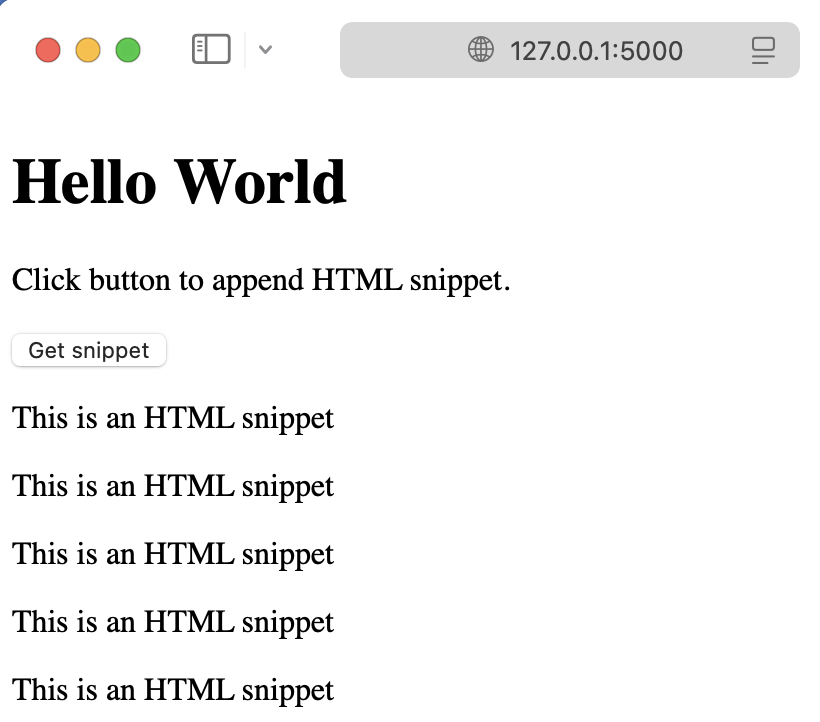
Running the Quart app creates the index page shown below. In the image, the button has been clicked five times therefore five HTML snippets were appended to the div.
Further reading
See the Datastar and Quart documentation for more information about these packages. The code discussed in this article is available in the pythonic/projects/datastar-append directory in the pythonic GitHub repository.
Gavin Wiggins © 2026
Made on a Mac with
Genja. Hosted on
GitHub Pages.